
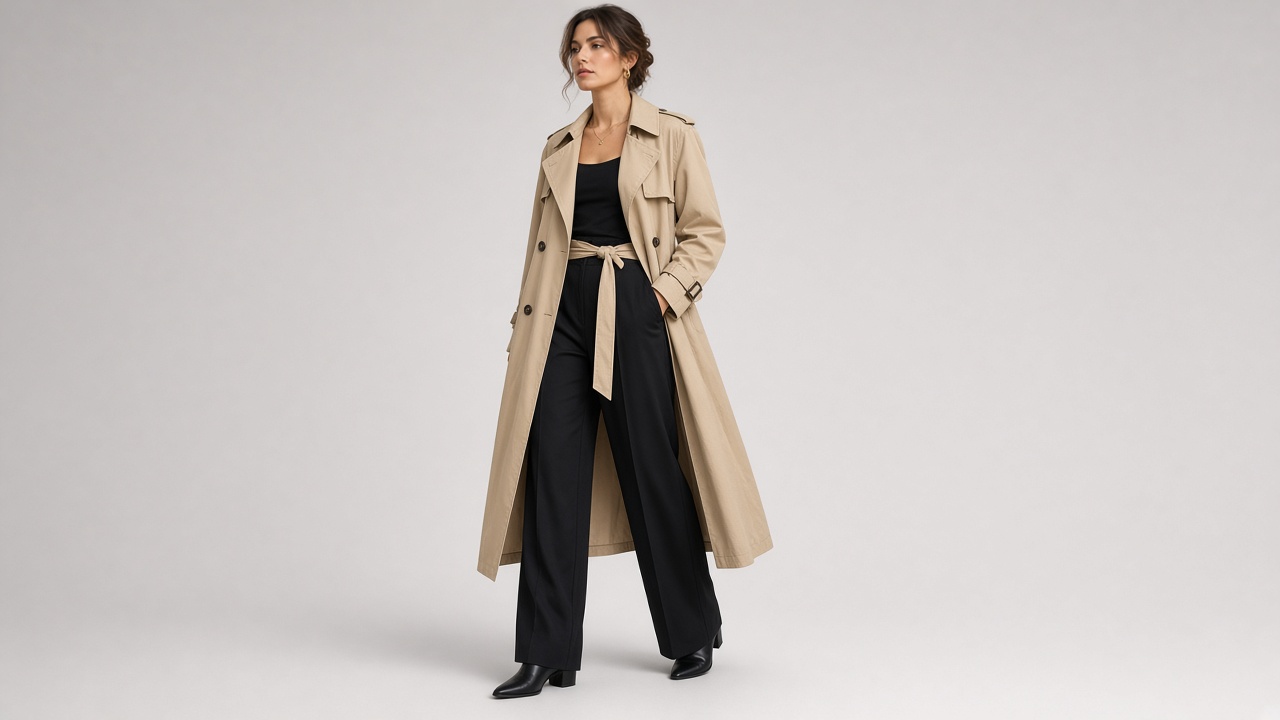
You have a great photo of a model wearing an outfit, but a still image can only show so much. What if you could turn that picture into a short fashion video?
With an AI fashion model video generator, you can upload a photo of a model wearing a dress, jacket, shirt, or complete outfit and create a moving video from it.
The model might walk toward the camera, gently turn to show the outfit, or move naturally in a fashion-style scene. This can be useful for clothing stores, fashion creators, and anyone who wants to make more engaging outfit content without filming a new video.
In this guide, you will learn how to animate a fashion model photo, explore different outfit video ideas, and use prompts to get better results.
What Can You Create from a Fashion Model Photo?
A single model photo can be used to create several types of fashion videos. The best effect depends on the original pose and how much of the outfit is visible.
Walking fashion video Turn a standing model photo into a short clip where the model takes a few natural steps toward the camera. This works well for dresses, coats, trousers, and everyday outfits.
Outfit showcase video Make the model gently turn to one side or change their pose to show more of the clothing. This can help viewers get a better impression of the overall outfit.
Fabric movement video Add subtle movement to loose clothing, such as a flowing dress, oversized shirt, long coat, or wide-leg trousers.
Fashion runway video Give a model photo a runway-inspired look with confident walking movements and a clean fashion-show atmosphere.
Social media outfit video Create short vertical fashion clips for TikTok, Instagram Reels, and other social platforms using existing model photos.
How to Turn a Fashion Model Photo into a Video with AI
You can create a fashion video without recording the model again. Follow these steps to get started.
Step 1: Choose a Clear Model Photo
Start with a photo where the model and clothing are easy to see.
A full-body image is a good choice if you want to create a walking or outfit showcase video. If you only want to animate the upper body or show a jacket, a waist-up image may be enough.
Look for these features:
- The model is clearly visible.
- The clothing is not hidden by other objects.
- The outfit has enough detail to recognize its style.
- The image is sharp and well-lit.
- The model's pose allows some natural movement.
A front-facing standing pose is a practical starting point for many fashion video ideas.
Step 2: Upload the Image to an AI Video Generator
Open an image-to-video AI tool and upload your fashion model photo.
Choose the video format based on where you plan to use it. Vertical videos are commonly used for social media fashion content, while horizontal videos may be more suitable for website banners or larger displays.
Step 3: Describe the Model's Movement
Tell the AI exactly what you want the model to do.
For example, if you want a walking video, you can write:
If you want to show the outfit from another angle, ask for a gentle turn instead.
Avoid combining too many actions in one prompt. A simple movement is often easier to generate naturally.
Step 4: Generate the Fashion Video
Start generating the video and wait for the result.
When it is ready, check the model's movement and the clothing details.
Pay particular attention to the outfit. Did the AI change the color? Did a pattern disappear? Does the clothing still have the same shape?
If the result is not right, simplify the prompt and generate another version.
Step 5: Download and Prepare the Video
Once the video looks good, download it.
You can use it as a fashion social media post, an outfit presentation, or a short product promotion. If you are using the video for an online clothing store, make sure the generated result accurately represents the actual product.
5 AI Fashion Video Prompts for Different Outfit Styles
Different clothing styles need different types of movement. Here are five prompts you can try.
Make a Model Walk in an Outfit
This is a good choice for full-body photos showing dresses, coats, suits, or casual clothing.
Show the Outfit from Different Angles
If you want viewers to see more of the clothing, a gentle body turn can be useful.
Create a Flowing Dress Video
Long dresses and skirts can look more interesting when the fabric moves naturally.
Make a Streetwear Fashion Video
This style works well for oversized shirts, jackets, jeans, sneakers, and casual outfits.
Create a Fashion Runway Video
If you want a more dramatic presentation, try a runway-inspired movement.
How to Keep the Original Clothing Design in the Video
One of the biggest problems with AI fashion videos is that the clothing may change during generation.
A jacket might become a different style, a dress might change length, or a pattern might disappear. This matters if you are creating a video to promote a real item of clothing.
Here are a few ways to reduce these problems.
Describe the clothing details Do not only say "Keep the outfit unchanged." Mention the important details, such as the color, sleeve length, collar, buttons, patterns, and overall shape.
For example:
Use simple movements Large turns and complicated body movements can make it harder for the AI to maintain the original clothing details. Start with a slow walk or a small pose change.
Choose a clear full-body image If you want to show the complete outfit, use a photo where the entire clothing item is visible. A cropped portrait is not a good starting point for a full outfit showcase.
Avoid unnecessary scene changes If the model moves from one location to another, the AI may also change other visual details. Keep the original background if your main goal is to show the clothing.
Review the entire video Check the outfit at the beginning, middle, and end. Sometimes the clothing looks correct in the first frame but changes as the model moves.
Why Does My AI Fashion Video Look Unnatural?
Not every generated video will look like a professional fashion advertisement. These are some common issues and ways to improve them.
The clothing changes during movement The AI may create a slightly different outfit when the model walks or turns. Use a more detailed clothing description and reduce the amount of movement.
The model's body looks distorted This can happen when the original pose is difficult to animate. Try a clear standing photo and ask for a small, natural movement instead of a full runway walk.
The fabric does not move naturally Loose clothing may move in strange ways if the prompt asks for too much motion. Describe gentle fabric movement and avoid dramatic wind effects.
The model does not walk properly Walking is more difficult to generate from a single still image because the original photo does not show the model's full movement. Start with a short, slow walk and review the result carefully.
The face changes Add instructions to preserve the model's original facial features, hairstyle, and appearance. Smaller movements may also help.
Where Can You Use AI Fashion Model Videos?
Once you have created a fashion video, you can use it in several ways.
- Online clothing stores: Add short animated outfit presentations to product or collection pages.
- TikTok and Instagram Reels: Turn existing model photos into short fashion posts.
- Fashion marketing: Create visual concepts for clothing promotions and seasonal campaigns.
- Fashion blogs: Add movement to outfit inspiration and styling content.
- Social media advertising: Test different visual styles using the same original model photo.
If the video is being used to sell clothing, remember that AI-generated movement can change small product details. Do not rely on it as the only source of information about the actual fit, fabric, or construction.
Turn Your Fashion Model Photo into a Video
You do not need a large fashion production team to experiment with video content. A clear photo of a model wearing an outfit can be enough to get started.
Choose one movement that fits the clothing. A slow walk works well for a complete outfit, a gentle turn helps show the shape of a dress, and subtle fabric movement can add life to a coat or skirt.
Keep the original clothing details in your prompt and review the generated video carefully.
With an AI fashion model video generator, you can turn an existing fashion photo into a new visual presentation without starting from a completely new photoshoot.